
Google Gemini AI Photo Editing Prompts help you edit and enhance photos using simple text instructions. With the right Gemini AI prompt, you can smooth the face, remove blemishes, blur or change backgrounds, and create professional or cinematic looks. These Google Gemini photo editing prompts are easy to copy and paste. They work perfectly for social media, profile pictures, and professional portraits. Anyone can use a prompt for Gemini AI to get high-quality, realistic photo edits in seconds.
1. Professional Portrait Prompt
Enhance the uploaded photo into a clean professional portrait. Smooth the face naturally, remove pimples and dark spots, improve lighting, sharpen details, and softly blur the background for a DSLR-style look.


2. Background Change Prompt
Remove the original background and replace it with a clean, realistic indoor or studio background. Match lighting and shadows naturally and keep the subject sharp and realistic.


3. Face Smooth & Clear Prompt
Make the face fully smooth and clear while keeping natural skin texture. Remove acne, marks, and uneven skin tone. Improve brightness and clarity without making the face look fake.


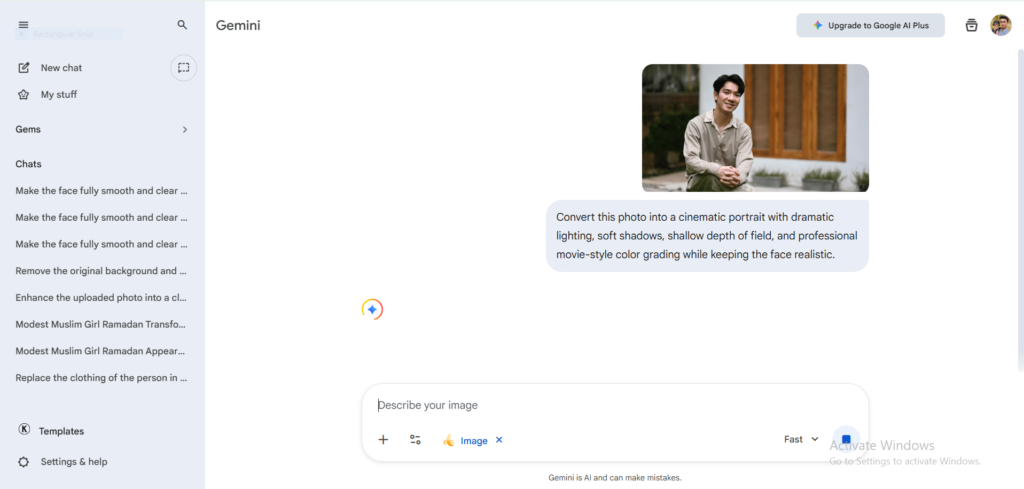
4. Cinematic Look Prompt
Convert this photo into a cinematic portrait with dramatic lighting, soft shadows, shallow depth of field, and professional movie-style color grading while keeping the face realistic.

5. Social Media Profile Picture Prompt
Create a high-quality social media profile photo. Enhance facial features, balance skin tone, improve lighting, blur the background, and give a clean modern Instagram-ready look.


These Google Gemini AI photo editing prompts are carefully written to give the best and most realistic results. You can simply copy any prompt, upload your photo in Gemini AI, paste the prompt, and generate a high-quality edited image in seconds. No photo editing skills are required. These prompts work well for portraits, social media photos, professional profiles, and creative edits.
Tips for Best Results:
- Always upload a clear, high-resolution photo
- Use one prompt at a time
- Avoid adding extra instructions unless needed
- Let Gemini AI handle lighting and realism
More advanced and updated Gemini AI prompts will be added regularly, so keep visiting this page for new content.